
Whether you are launching a brand-new apparel line, a tech accessory store, or a print-on-demand shop, variable products are the backbone of your business. You need a clean way to let customers select their exact color, size, material, or style configuration before hitting the checkout button.
If you read the standard documentation, setting this up seems simple enough. But there is a massive difference between setting up one test product with two variants and trying to build a fully active, wholesale catalog.
Let’s look at how to add attributes and variations to your store natively, why the standard process breaks down at scale, and how to automate the friction away entirely.
Part 1: The Traditional, Manual Method (The “Click Frenzy”)
To understand why your workflow hits a wall, you have to look at the sheer volume of mouse clicks required by the default WooCommerce dashboard. Here is the standard protocol:
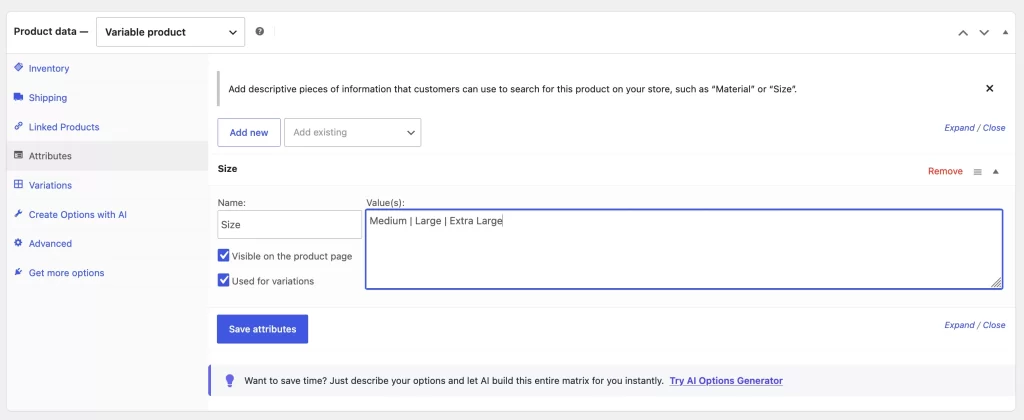
Step 1: Define Global Attributes
First, you have to navigate away from your product page to Products > Attributes. Here, you create your taxonomy containers (like “Color” or “Size”) and manually type in every single variable term one by one, hitting save after each entry.
Step 2: Configure the Product Meta Box
Next, you open your product editor, scroll down to the Product Data panel, and change the product type drop-down framework from Simple Product to Variable Product.
Step 3: Link and Map the Attributes
You click the Attributes tab, select your global attribute from a drop-down menu, click Add, select every single term you just created, and check the boxes for “Visible on the product page” and “Used for variations”. You hit save and wait for the dashboard to refresh.
Step 4: Generate the Complete Matrix
Now you click the Variations tab. You open another drop-down menu, select “Generate variations from all combinations”, and hit Go. If you have 5 colors and 6 sizes, WooCommerce spins up 30 individual rows.
Step 5: Manual Data Entry Loop
This is where the actual bottleneck begins. You have to click into every single one of those 30 rows individually to manually type in:
- A unique, modified SKU.
- The specific inventory stock level.
- The regular price and sale price.
- A variation-specific description snippet.
If you have to do this for just 10 items, you are looking at 300 individual data forms to fill out by hand. It is slow, mind-numbing, and incredibly prone to typos.
Part 2: The Modern, AI-Powered Approach
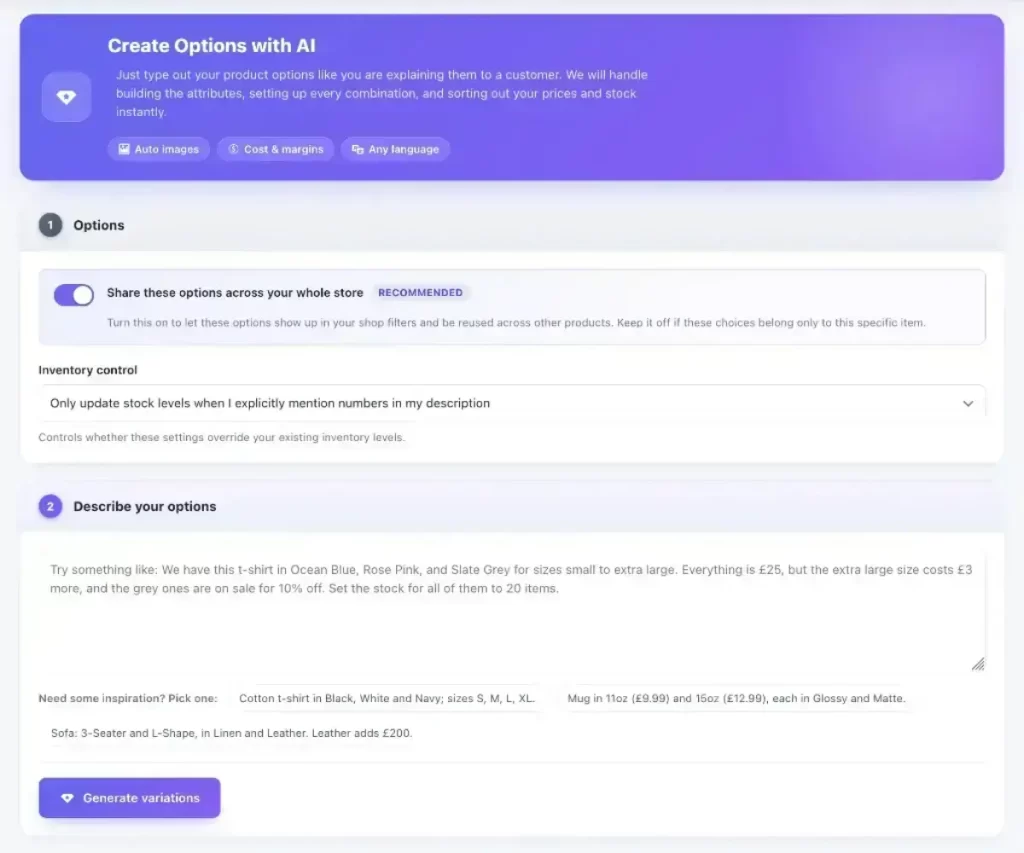
You shouldn’t have to spend your afternoons acting like a human database router. With the AI Variation Generator (AIVG), we compressed this entire multi-step loop into a single, seamless, natural-language interface.
Here is how you add the exact same 30 variations in less than five seconds:
Step 1: Open the AI Dashboard Panel
Open any product page inside your WordPress dashboard and look at the native AIVG side panel overlay.
Step 2: Describe Your Matrix in Plain English
Instead of jumping between multiple admin settings screens and clicking dozens of drop-downs, you type your setup parameters directly into the prompt terminal exactly like you are speaking to a virtual assistant:
“Add attributes for Sizes S through XXL and Colors Black, Cream, and Sage. Set the baseline price to $29, but make the XXL size $34. Automatically generate matching SKUs.”
Step 3: Hit Generate
The AI instantly interprets the human context, builds the backend database relationships, calculates your custom pricing rules, auto-assigns pristine alphanumeric SKUs, and compiles your entire variant layout into a perfectly structured table.
Stop Clicking. Start Scaling.
The native WooCommerce variation loop was built over a decade ago for an era when online stores only managed a handful of simple products. The e-commerce landscape moves too fast for manual entry now. By shifting to an automated AI pipeline, you can cut your product creation time from hours down to literal seconds.
We are officially inviting high-volume store owners and developers to join our high-performance, free beta phase. If you are ready to eliminate the manual bottleneck and scale your product catalog effortlessly, lock in your priority entry below.